

Building a WordPress website with Divi is a great choice if you want a professional website without writing much code. But there is one decision that can make a major difference to your website’s speed, stability, security, and future growth: choosing the right hosting.
If you’re searching for the best hosting for Divi, don’t choose a hosting plan only because it is cheap. A Divi website can use more server resources as you add visual sections, images, plugins, forms, animations, WooCommerce features, and other functionality.
In this guide, I’ll explain what to look for in Divi hosting, the hosting requirements you should check, which type of hosting is suitable for different websites, and why Hostinger is a practical option for many beginners and small businesses in India.
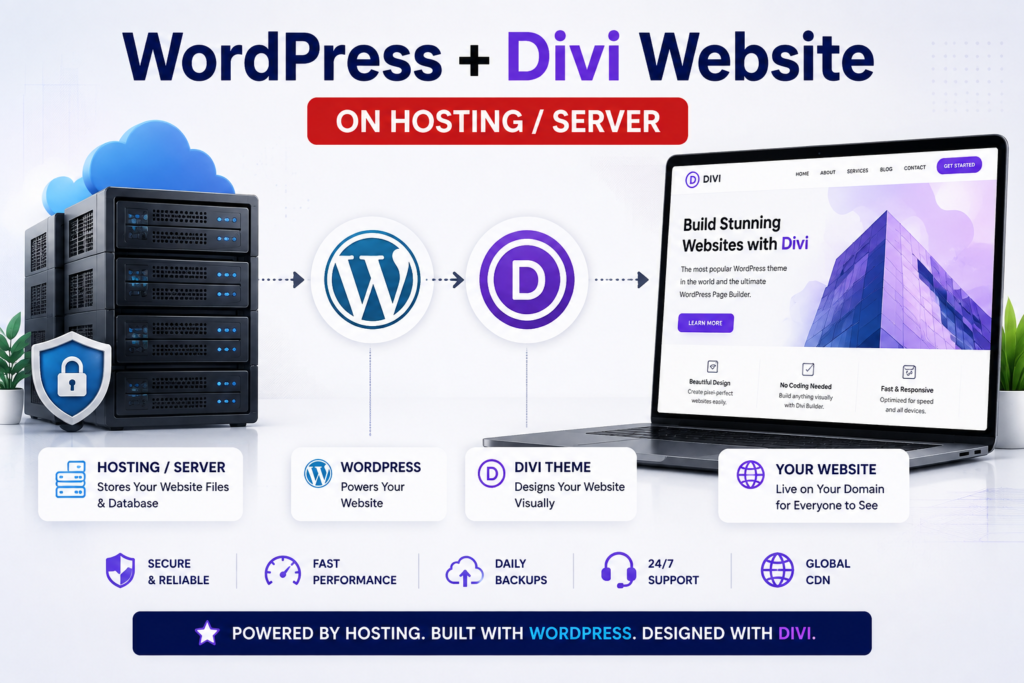
Quick answer: For a beginner building one or a few Divi websites, a good managed WordPress/shared hosting plan can be enough. For larger or high-traffic Divi websites, look for more CPU/RAM resources or move to cloud/VPS hosting as your website grows.
Table of Contents
What Is the Best Hosting for Divi?
The best hosting for Divi is not simply the host with the lowest price. It should provide a WordPress-compatible server environment, sufficient PHP resources, HTTPS, reliable backups, good caching/CDN options, and an easy way to manage WordPress.
Divi’s official requirements recommend PHP 7.4 or higher, with PHP 8.0+ recommended, a PHP memory limit of at least 128 MB, post_max_size and upload_max_filesize of 64 MB, and max_execution_time of 120 seconds. Divi also recommends MySQL 5.7+ or MariaDB 10.2+.
WordPress itself currently lists PHP 7.4+, MySQL 5.7+ or MariaDB 10.3+, and HTTPS support among its server-side requirements.
My Recommendation for Indian Beginners
For a beginner, freelancer, blogger, or small business owner:
Hostinger WordPress Hosting → A practical starting option
Hostinger currently offers WordPress hosting plans in India with features such as SSL, backups, CDN options, WordPress support, and 24/7 support. Its current promotional pricing and features vary by plan and subscription term, so check the live offer before purchasing.
Important: I recommend choosing based on your website’s requirements rather than buying a plan simply because it has the biggest discount.
Why Is Hosting Important for a Divi Website?
Divi gives you a visual environment for designing websites, but your hosting server still has to process WordPress, PHP, your database, plugins, images, and other website requests.
A poor hosting setup can result in:
- Slow page loading
- Divi Builder timeouts
- Problems saving large layouts
- Slow WordPress Dashboard
- Poor user experience
- Difficult website management
- Performance problems as traffic grows
A good hosting setup provides the foundation on which your WordPress and Divi optimization efforts can work.
Google recommends paying attention to overall page experience, including Core Web Vitals, HTTPS, and mobile usability. Good Core Web Vitals are strongly recommended for a good user experience and search performance, although they do not guarantee high Google rankings.
What Should You Look for in Divi Hosting?
Before purchasing hosting, check these factors.
1. PHP Version
Divi recommends PHP 8.0+ and requires PHP 7.4 or higher according to its published requirements.
Your hosting provider should allow you to use a current supported PHP version.
2. PHP Memory Limit
For Divi, Elegant Themes recommends at least:
128 MB PHP memory limit
For websites with many plugins, complex layouts, WooCommerce, or larger workloads, having additional resources can be useful.
If you experience errors while using Divi Builder, check your server PHP limits before assuming the theme itself is the problem.
3. Upload and Execution Limits
Divi’s published guidelines include:
upload_max_filesize: 64 MBpost_max_size: 64 MBmax_execution_time: 120 secondsmax_input_time: 60 secondsmax_input_vars: 1000
These settings can be especially relevant when importing layouts, uploading larger files, or working with complex websites.
4. SSD or NVMe Storage
Modern storage can help with website responsiveness, especially when combined with good server architecture and caching.
Don’t look only at the storage number, though.
A website with 50 GB of storage is not automatically faster than a website with 20 GB.
Look at the complete hosting environment.
5. Backups
Backups are extremely important for WordPress websites.
Before installing a new plugin, changing a theme, or making major design changes, you should have a recovery strategy.
Hostinger currently lists weekly backups on some entry-level plans and daily backups on higher plans, but the exact backup frequency depends on the plan.
Always check the current plan details before purchasing.
6. CDN
A Content Delivery Network (CDN) stores or serves website assets through distributed servers, helping deliver content efficiently to visitors in different locations.
This can be particularly useful if your website has visitors from multiple cities or countries.
Hostinger currently includes CDN-related features on its WordPress plans, depending on the plan.
7. Server Resources
This is one of the most important factors as your Divi website grows.
A small portfolio website and a large WooCommerce website shouldn’t necessarily use the same hosting plan.
Think about:
- CPU
- RAM
- PHP workers
- Storage
- Traffic
- Number of websites
- Database workload
If your Divi website becomes resource-intensive, upgrading hosting can be more effective than endlessly installing optimization plugins.
Hostinger vs Other Types of Hosting for Divi
Instead of asking only “Which company is best?”, it is better to ask:
Which hosting type is best for my Divi website?
| Website Type | Recommended Hosting |
|---|---|
| Beginner blog | Basic WordPress/shared hosting |
| Personal website | Shared/managed WordPress hosting |
| Small business website | Better shared/managed WordPress plan |
| Freelancer managing multiple websites | Higher shared/managed plan |
| High-traffic website | Cloud/VPS |
| Large WooCommerce website | Cloud/VPS or specialized managed hosting |
| Agency with many websites | Cloud/VPS or managed infrastructure |
This approach is more useful than choosing a provider based only on promotional pricing.
Hostinger for Divi Websites: Is It a Good Option?
For many beginners in India, Hostinger is worth considering for Divi websites because its WordPress hosting plans combine beginner-friendly management with features such as backups, CDN, SSL, WordPress support, and 24/7 support.
Hostinger currently lists several WordPress hosting levels.
Single
Designed for getting one website online.
The current listing includes:
- 1 website
- 10 GB SSD storage
- Free weekly backups
- CDN
- SSL
- WordPress support
Premium
A better option when you need more flexibility.
The current listing includes:
- Up to 3 websites
- 20 GB storage
- Free weekly backups
- CDN
- Free domain for one year on the listed offer
Higher-Tier Plans
Hostinger also lists plans with more storage, more websites, daily backups, and additional resources.
For example, its Unlimited plan currently lists 50 GB NVMe storage and daily backups, while Cloud Startup is positioned for agencies or higher-traffic projects and lists 100 GB NVMe storage.
Prices and promotional offers change frequently, so don’t copy a price from an old blog post. Check the current Hostinger page before publishing or purchasing.
Which Hostinger Plan Should You Choose for Divi?
Hostinger offers different hosting plans for different types of websites. If you are planning to build a WordPress website using Divi, you don’t necessarily need the most expensive plan.
The right plan depends on how many websites you want to build, how much storage you need, and whether you need features such as CDN, daily backups, and ecommerce support.
Here is a simple comparison of the plans shown in the current Hostinger offer.
| Feature | Single | Premium | Business | Unlimited |
|---|---|---|---|---|
| Websites | 1 | 3 | 50 | Unlimited |
| Storage | 10 GB SSD | 20 GB SSD | 50 GB SSD | 50 GB NVMe |
| Free Domain | ❌ | ✅ 1 year | ✅ 1 year | ✅ 1 year |
| Backups | Weekly | Weekly | Weekly | Daily |
| CDN | ❌ | ❌ | ✅ | ✅ |
| Ecommerce | ❌ | ❌ | ✅ | ✅ |
| AI Tools | ❌ | ❌ | ❌ | ✅ |
| Priority Support | ❌ | ❌ | ❌ | ✅ |
| WordPress | ✅ | ✅ | ✅ | ✅ |
Note: Prices, discounts, features and renewal rates can change. Always check the current Hostinger pricing page before purchasing.
Step 1: Decide What Website You Are Building
First identify your website type.
For example:
Example 1: Personal blog
Example 2: Business website
Example 3: Freelancer portfolio
Example 4: Online store
Example 5: Membership website
A simple blog doesn’t need the same resources as a large online store.
Step 2: Estimate Your Traffic
Ask yourself:
- Is this a new website?
- Will I receive 100 visitors per day?
- Will I run paid advertising?
- Will I publish videos?
- Will I have thousands of visitors?
- Will I have WooCommerce?
If you’re starting from zero, don’t overspend on infrastructure you don’t currently need.
Choose a scalable option and upgrade when necessary.
Step 3: Check Divi Requirements
Before buying, verify that the hosting environment supports the requirements you need.
At minimum, check:
- PHP version
- PHP memory
- Upload limit
- Execution time
- Database version
- HTTPS
- Backup system
Divi’s official documentation is the best place to verify current requirements because technical requirements can change over time.
Step 4: Install WordPress
Most modern WordPress hosts provide an easy installation process.
After installation:
WordPress Dashboard → Appearance → Themes
Then install your Divi theme.
Elegant Themes’ current Divi 5 documentation describes the standard process as downloading the Divi ZIP file, going to Appearance → Themes → Add New → Upload Theme, installing it, activating it, and connecting your Elegant Themes license.
Step 5: Configure Divi
After activating Divi, configure your basic website settings.
For example:
- Brand colors
- Typography
- Logo
- Header
- Footer
- Global presets
- Responsive settings
- Performance settings
Divi’s performance tools include features such as Dynamic Module Framework, Dynamic Icons, and Critical CSS.
How to Optimize Hosting for Divi
Choosing good hosting is only the first step.
You should also optimize your website.
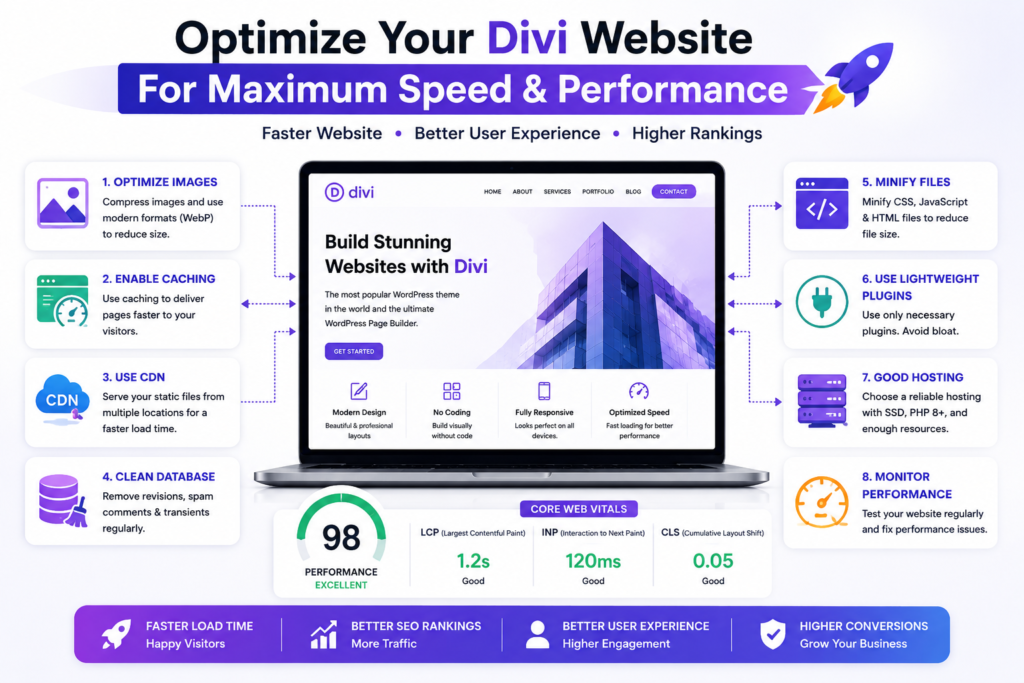
1. Optimize Images
Large images can significantly increase page weight.
Before uploading:
- Resize images
- Compress them
- Use modern formats where appropriate
- Avoid uploading unnecessarily large originals
Elegant Themes specifically recommends reducing image size and page weight when optimizing Divi websites.
2. Use Caching
Caching allows frequently requested content or assets to be served more efficiently.
Depending on your hosting setup, you may use:
- Server-level caching
- WordPress caching
- CDN caching
- Browser caching
Be careful when combining multiple caching systems because conflicting configurations can cause problems.
3. Use a CDN
A CDN can help deliver static assets efficiently to visitors in different locations.
This becomes increasingly useful when your website receives visitors from different regions.
4. Keep WordPress Updated
Keep your:
- WordPress core
- Divi
- Plugins
- PHP
updated.
Always test major updates on important websites and maintain a backup before making significant changes.
5. Don’t Install Too Many Plugins
More plugins don’t automatically mean a better website.
Before installing a plugin, ask:
Do I really need this functionality?
A clean WordPress installation is generally easier to maintain.
Divi Hosting Performance Checklist
Before launching your website, check this:
Server
- ✅ Current supported PHP version
- ✅ Adequate PHP memory
- ✅ Adequate execution time
- ✅ Compatible database
- ✅ HTTPS enabled
WordPress
- ✅ Latest stable WordPress version
- ✅ Updated Divi
- ✅ Updated plugins
- ✅ Proper permalink structure
- ✅ Regular backups
Divi
- ✅ Performance settings reviewed
- ✅ Dynamic features configured appropriately
- ✅ Responsive design tested
- ✅ Global presets used
- ✅ Unnecessary animations removed
Performance
- ✅ Images compressed
- ✅ Caching configured
- ✅ CDN considered
- ✅ Mobile performance tested
- ✅ Core Web Vitals monitored
Google recommends monitoring Core Web Vitals, with current “good” targets of LCP within 2.5 seconds, INP below 200 milliseconds, and CLS below 0.1. These are useful performance goals, not guarantees of search rankings.
Common Divi Hosting Mistakes to Avoid
Mistake 1: Choosing Hosting Only Because It Is Cheap
The cheapest plan isn’t always the best choice.
Look at the complete resource allocation and renewal pricing.
Mistake 2: Ignoring Renewal Prices
Hosting companies frequently advertise introductory pricing.
Before buying, check:
Promotional price → Renewal price → Subscription duration
This is especially important when comparing hosting providers.
Mistake 3: Buying Too Much Hosting
A beginner blog doesn’t necessarily need a powerful VPS.
Start with an appropriate plan and scale when your website actually requires more resources.
Mistake 4: Installing Too Many Optimization Plugins
More optimization plugins can sometimes create conflicts.
Start with a simple, controlled setup.
Mistake 5: Ignoring Mobile Performance
A beautiful desktop website isn’t enough.
Test your Divi website on:
- Mobile
- Tablet
- Desktop
Google recommends considering mobile usability and overall page experience rather than focusing on a single performance score.
Pro Tips for Divi Website Owners
Tip 1: Build with Global Presets
Instead of manually styling every button, heading, and section, use Divi’s global design system.
This makes future changes much faster.
Tip 2: Keep Your Design Simple
You don’t need dozens of animations to create a professional website.
Good typography, spacing, hierarchy, and optimized images usually have a bigger impact.
Tip 3: Optimize Before You Upgrade
If your site is slow, investigate the cause first.
Check:
- Images
- Plugins
- Database
- Caching
- CDN
- Hosting resources
Don’t automatically assume you need a VPS.
Tip 4: Monitor Your Website
Use tools such as Google Search Console and PageSpeed Insights to understand real-world performance.
Tip 5: Plan for Growth
If you’re creating a business website today, think about where it could be in 12–24 months.
Choose hosting that allows you to upgrade without rebuilding the entire website.
Recommended Hosting for My Divi Website
If you’re a beginner in India and want to create a WordPress website using Divi, Hostinger is one hosting option I would consider first because of its beginner-friendly WordPress offering, current feature set, support options, backups and CDN availability.
However, your ideal plan depends on your website.
For a beginner
Choose a suitable entry-level WordPress plan.
For a freelancer
Choose a plan that can comfortably host multiple websites.
For a business
Consider additional resources, backups and performance features.
For high traffic
Consider cloud or VPS infrastructure.
👉 Get Recommended WordPress Hosting →
Affiliate Disclosure: Some links in this article may be affiliate links. If you purchase through one of these links, I may earn a commission at no additional cost to you.
Conclusion
Choosing the best hosting for Divi is about finding the right balance between performance, resources, reliability, support, price, and scalability.
If you’re starting a new WordPress website in India, you don’t necessarily need expensive VPS hosting from day one. A suitable WordPress hosting plan can be enough for a blog, portfolio, small business website, or beginner Divi project.
For many beginners, Hostinger is a practical option to consider, especially when its current WordPress plans provide the features and resources your website needs. As your traffic and functionality grow, you can move to a higher-tier or cloud hosting environment.
The most important lesson is simple:
Don’t choose hosting based only on price. Choose hosting based on what your Divi website actually needs.
If you’re ready to build your first WordPress website with Divi, start with reliable hosting, install WordPress, install Divi, optimize your website, and build with performance in mind from day one.
👉 Build Your WordPress Website →

0 Comments